The Biggest Challenge on the Manufacturing Floor
Every factory manager knows this problem: you don't know exactly where your goods are.
Raw materials come in, but how many have already entered production? WIP (Work in Progress) is scattered across dozens of points on the factory floor. Finished goods are ready to ship, but does the physical count match the system?
This is the reality at most Indonesian factories that still rely on manual records or conventional barcodes:
- Stock counts take 2 to 3 days: Production must stop or slow down
- Stock data lags 24 to 48 hours behind actual floor conditions
- WIP "disappears": Items are on the floor but not in the system, or vice versa
- Bottlenecks go undetected: You can't tell which production area is holding up material flow
- ERP integration breaks down: Data from the warehouse to Odoo or SAP is frequently out of sync
UHF RFID technology addresses each of these problems.
What Is WIP Tracking with RFID?
Work in Progress (WIP) refers to all materials and items that have entered the production process but have not yet become finished goods. In a timber factory, WIP is pallets of dried wood that have been cut but not yet finished. In a building materials factory, WIP is chemicals that have been mixed but not yet packaged.
WIP tracking with RFID means:
- Every unit or pallet gets an RFID tag when it enters the production process (inbound)
- Tags are read automatically when items move between production areas (no manual scanning needed)
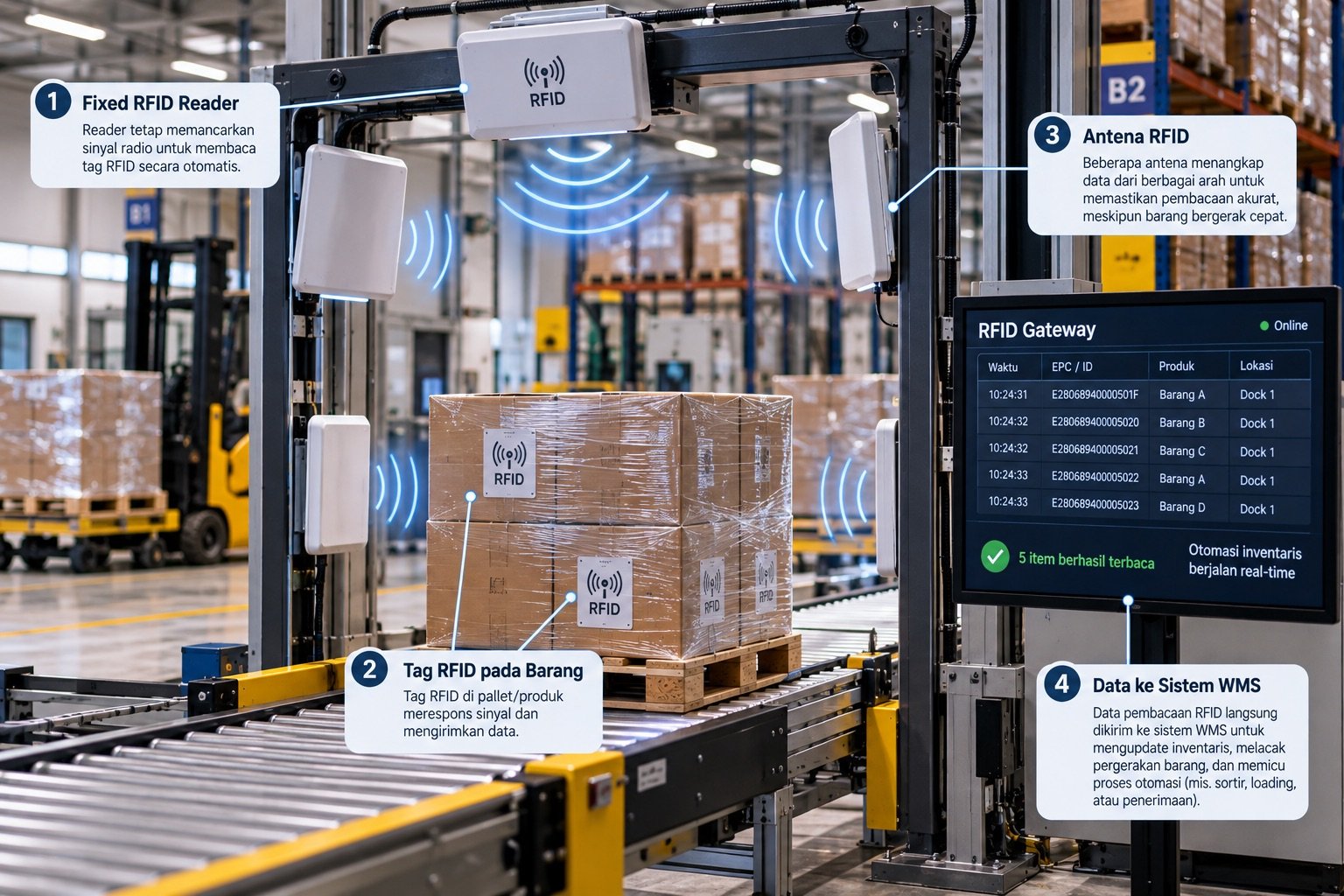
- Fixed readers at gates record movements automatically, with no human intervention
- A real time dashboard shows the location of every item at any moment
The result: full visibility from raw material intake through to finished goods shipment.
How a Manufacturing RFID System Works
Step 1: Inbound Registration (Raw Materials Arriving)
When materials arrive at the warehouse or factory, operators perform inbound scanning with a handheld RFID scanner:
- Each unit or pallet receives a unique RFID tag (EPC code)
- Data recorded: material type, quantity, supplier, arrival date, and initial placement area
- RFID labels are printed onsite using an RFID label printer (ZPL format)
- Data enters the platform immediately, with no manual data entry
Step 2: Area Management (WIP Movement)
When materials move from one area to another (e.g., from the raw materials warehouse to the production area):
- The operator uses the handheld scanner's "Move Area" function
- Or a fixed reader at the gate records the movement automatically, without any operator action
- The platform records the time, origin area, destination area, and who performed the movement
Step 3: Real Time Visibility (Dashboard)
In the office, managers view a dashboard showing:
- Current location of every item: Which area it is in right now
- Movement history: A complete audit trail from inbound to the present
- Stock by area: How many units are in the raw materials warehouse, the production area, and finished goods
- Alerts: Items that have stayed in one area too long (a potential bottleneck indicator)
Step 4: Automated Outbound (Finished Goods Leaving)
When finished goods pass through the outbound gate or into the distribution area:
- The fixed reader reads tags automatically, with no manual scanning required
- Stock is immediately reduced in the system
- If ERP integration (Odoo) is active, data syncs automatically
- Shipment reports are generated automatically
Example Scenario: A Timber Processing Plant
Consider a timber processing plant that needs to track pallets of dried timber from storage through to production.
Typical Challenges Before RFID
- Thousands of timber pallets spread across several storage zones
- Manual stock audits require 2 to 3 days with a large team
- Pallets often end up in the wrong area because staff move them without recording it in the system
- When timber enters the final production area, it is recorded manually, which is slow and error prone
- Data for the owner and internal auditors is only available after the manual audit is completed
Solution
Hardware:
- UHF RFID handheld scanner for field operations (inbound, area management, audits)
- Desktop USB reader for office operations (registration, verification)
- Fixed reader at the production area gate for outbound automation (timber entering production is recorded automatically)
Software (Katalyst Platform):
- Dried timber workflow: A configured flow for pallet tracking (Register Pallet → Set Area → Move Area → Outbound)
- Storage zones configured to match the site's physical layout
- Custom master data: wood grade, dimensions (thickness, width, length), and wood origin
- Dual identification: RFID EPC plus barcode on each pallet (the barcode is a fallback if a tag is damaged)
- Reusable RFID tags, reused across pallets as stock turns over
New Workflow:
- A dried timber pallet arrives → the operator scans it inbound on the handheld → an RFID tag is affixed → the system records its initial area
- A forklift moves the pallet → the operator scans "Move Area" → the system updates its location in real time
- The pallet passes through the production area gate → detected tags are recorded automatically, subject to configuration and site conditions
- The owner and internal auditors open the dashboard → they see the position of every pallet in real time
Illustrative Scenario Results
- Audit time may decrease after the workflow and reader coverage are adapted to the site
- No manual entry at the production area gate; the fixed reader handles it
- Real time visibility for the factory owner and internal audit team
- Movement records: Detected tags can be logged with timestamps and available user information
RFID Benefits for Manufacturing: An Example Scenario
The figures below are illustrative examples, not benchmarks or measured Katalyst client results. Actual results need on-site validation and depend on the process, items, and device configuration.
| Metric | Before RFID | After RFID | Improvement |
|---|---|---|---|
| Stock audit time | Measure the site baseline | Measure in a pilot | Depends on workflow |
| Inventory accuracy | Measure the site baseline | Measure in a pilot | Depends on workflow |
| Manual data entry per day | Measure the site baseline | Measure in a pilot | Depends on workflow |
| WIP visibility | Current process | Reader coverage | Depends on design |
| Bottleneck detection | Current process | System configuration | Depends on design |
ERP Integration (Odoo, SAP, Accurate)
RFID can be connected to an existing ERP when the systems and workflows are compatible. Integration scope and availability for Odoo, SAP, Accurate, or another system should be confirmed during technical assessment.
With ERP integration:
- RFID stock movements update the ERP automatically, with no double data entry
- ERP purchase orders trigger inbound tasks in the RFID platform, so a single workflow runs from purchase order to receipt
- ERP financial reports are more accurate because stock data comes from RFID in real time
This eliminates "double keying", the classic problem in factories that have both a warehouse floor and an ERP system but no connection between them.
Types of Factories That Benefit Most
RFID for manufacturing is best suited for:
Factories with high item volumes:
- Thousands of SKUs or units that need individual tracking
- Multiple complex production areas or zones
- Large teams requiring real time coordination
Operations with regulatory requirements:
- Food & beverage: Traceability from raw material to finished product
- Pharmaceuticals: Batch tracking for recall management
- Timber: Legal documentation of wood origin and certification
Factories with an existing ERP:
- Already using Odoo, SAP, or Accurate, but inventory data is frequently inaccurate
- Want real time synchronization between the factory floor and office systems
Implementation Steps for Your Factory
RFID implementation in manufacturing can be planned in four phases. Actual duration depends on site coverage, workflows, equipment, and integration requirements:
Phase 1: Assessment (1 to 2 days)
- The Katalyst team visits your site
- Maps the warehouse and production area layout
- Identifies the items to track and the right tag types
- Estimates hardware requirements
Phase 2: Setup & Configuration (3 to 5 days)
- Platform configuration: SKU master data, areas, user roles
- Fixed reader installation at relevant gates (if applicable)
- RFID tags printed and affixed to existing inventory
- ERP integration configuration (if required)
Phase 3: Training & Parallel Run (1 week)
- Warehouse team trained on the handheld scanner
- Managers trained on the dashboard
- Parallel operation (manual + RFID) to verify accuracy
Phase 4: Go-Live & Support
- Full switchover to the RFID system
- Ongoing support from the Katalyst team, including remote access
- SOP documentation and user manual provided
- Monthly optimization reviews
Conclusion
RFID is no longer reserved for multinational corporations. With practical rollout planning and clear operational goals, WIP tracking with RFID is a sensible digital transformation step for Indonesian manufacturers in 2026.
Start with a free demo or read the industry workflow examples for implementation details.