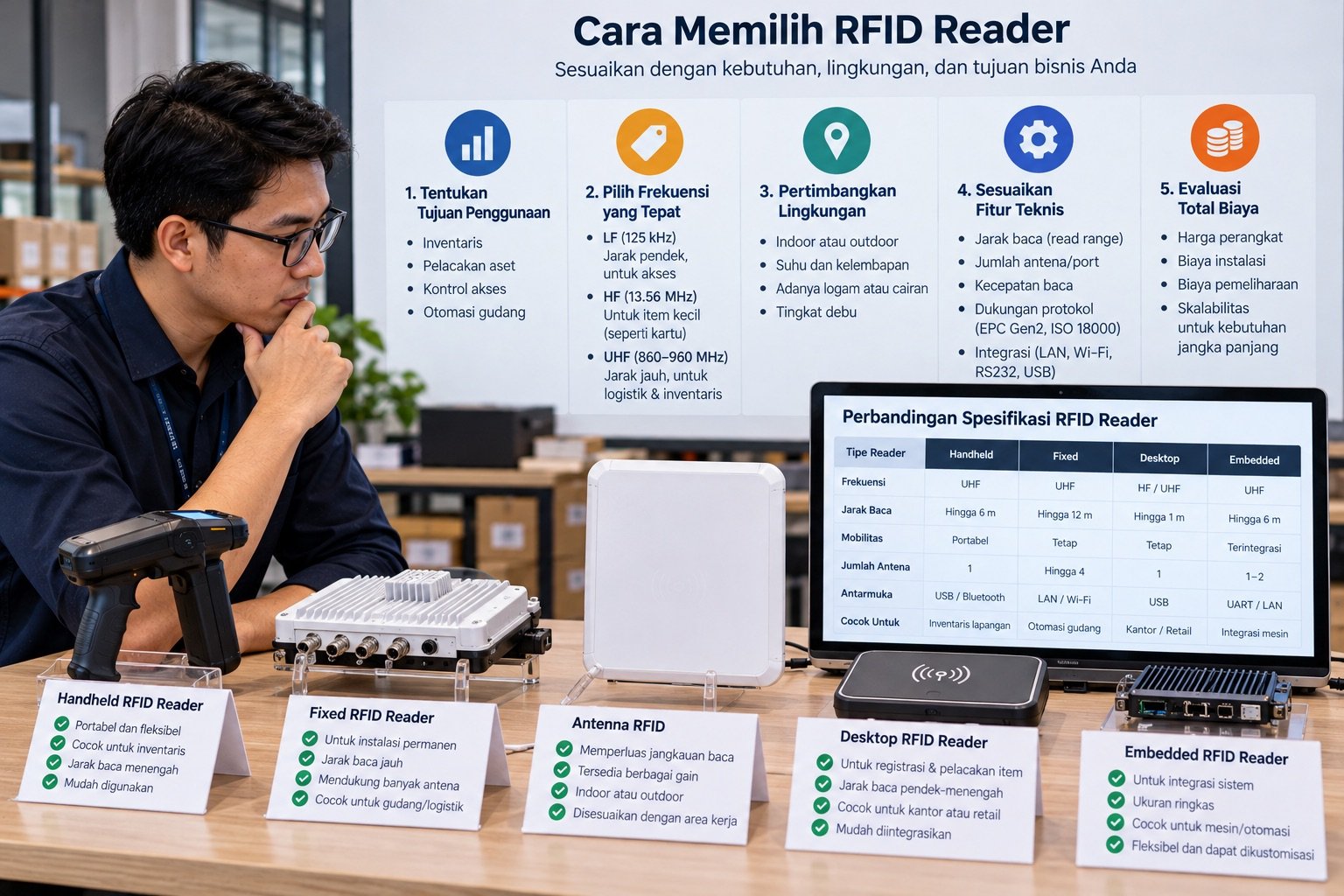
Why Choosing the Right RFID Reader Matters
The RFID reader is the heart of your RFID system. Choose the wrong one, and the tags, software, and infrastructure built around it can go to waste: slow operations, many tags left unread, or a system that can't scale as your business grows.
This guide helps you choose the right RFID reader based on your specific business needs, not just spec sheets.
Three Types of RFID Readers on the Market
1. Handheld RFID Scanner
A portable reader operated by staff on the floor. It is shaped like a pistol grip barcode scanner, with a small screen and a trigger button.
Best for:
- Warehouse stock audits (walking the aisles while scanning)
- Stocktakes across large areas
- Picking and packing operations that require mobility
- Spot checks during inbound and outbound verification
Advantages:
- Flexible: can be taken anywhere in the warehouse
- Reads hundreds of tags in one sweep without looking at each tag individually
- Built-in display shows scan results immediately
- Wi-Fi or Bluetooth connection to the software platform
Limitations:
- Requires a human operator
- Not automatic; staff must actively scan
- Battery needs charging (typically 8 to 12 hours per charge)
2. Desktop USB RFID Reader
A small stationary reader that connects to a computer via USB. It is usually a flat pad or small antenna placed on a desk.
Best for:
- Receiving desks: verifying items one by one as they arrive
- Registering new tags in the system (enrollment)
- Cashier or checkout operations for high value items
- Quality control stations that inspect each unit
Advantages:
- Plug and play: easy setup, no infrastructure needed
- The most affordable reader type
- No separate power supply needed; it runs on USB power from the computer
- Ideal for non-technical teams
Limitations:
- Very limited range (usually < 1 meter)
- Not portable; must stay near a computer
- Not suitable for bulk scanning many items at once
- Tags can "collide" if too many are within its small read field
3. Fixed RFID Reader (Gate/Stationary Reader)
Readers permanently installed at strategic points: warehouse doors, loading docks, conveyor belts, or entry and exit portals.
Best for:
- Automating inbound and outbound verification at dock doors
- Gate scanning: every item passing through the door is recorded automatically
- Conveyor automation: scanning items as they move along a belt
- Zone monitoring: detecting item movement between areas
Advantages:
- Fully automatic: No operator needed; works 24/7
- Can record detected tags as a pallet passes through; validate throughput on site
- Direct integration with WMS/ERP systems via API
- Eliminates human error in receiving and shipping
Limitations:
- More complex installation (cabling, mounting, antenna configuration)
- Requires careful infrastructure planning
- More hardware per installation point (reader, antennas, mounting)
- Needs antenna tuning to avoid reading unintended areas
Use Case Matrix: Which Reader Fits Your Needs?
| Business Need | Handheld | Desktop USB | Fixed Reader |
|---|---|---|---|
| Warehouse stock audit | ✅ Best fit | ❌ | ❌ |
| Daily bulk pallet receiving | ✅ Good | ❌ | ✅ Best fit |
| Item by item verification | ✅ | ✅ Best fit | ❌ |
| Entry/exit door automation | ❌ | ❌ | ✅ Best fit |
| Non-technical field team | ✅ Best fit | ✅ | ❌ |
| 24/7 operations without an operator | ❌ | ❌ | ✅ Best fit |
| 500 to 5,000 m² warehouse area | ✅ | ❌ | ✅ |
| Retail store (item checkout) | ❌ | ✅ Best fit | ❌ |
5 Technical Specs You Must Check
Before buying, ask the vendor for a spec sheet and check that these numbers make sense for your needs:
1. Frequency Band
For inventory in Indonesian warehouses, you need UHF RFID at 920 to 923 MHz, the band permitted in Indonesia under communications ministry regulations (Komdigi, formerly Kominfo). Don't buy a reader that only supports 902 to 928 MHz without confirming that it is compatible with the Indonesian band; it could violate regulations.
2. Output Power
Expressed in dBm. Handhelds are typically 30 to 33 dBm, while fixed readers can go up to 33 to 36 dBm. Higher power means longer range, but it needs proper configuration to avoid "overshooting" into unintended areas.
3. Tag Read Rate
How many tags can be read per second. The minimum acceptable for a modern warehouse is 100 tags per second for a handheld and 400+ tags per second for a fixed reader. Entry level readers typically manage only 50 to 80 tags per second, which is too slow for large audits.
4. Antenna Ports (for Fixed Readers)
Fixed readers come with 1, 2, 4, or 8 antenna ports. More ports let one reader cover more area. For a standard dock door, 4 ports is usually enough (2 antennas on the left and right, 2 at the top and bottom).
5. Connectivity
- Handheld: Make sure 5 GHz Wi-Fi and Bluetooth 5.0 are available
- Fixed: Make sure there is an Ethernet port (not just Wi-Fi) for a stable connection
- All: Make sure the SDK/API is supported by your software vendor
Questions You Must Ask RFID Reader Vendors
Before committing to a purchase, ask:
"Is this reader certified for use in Indonesia by the communications ministry (Komdigi, formerly Kominfo)?"
- Uncertified readers can be confiscated during inspections
"What is the warranty period, and how do warranty claims work in Indonesia?"
- An imported reader without local support is a major risk if it breaks
"Is there an SDK or API to integrate with our software?"
- A reader that only works with the vendor's proprietary software means vendor lock-in
"What is the tag read rate with many tags present (not a single tag)?"
- Many vendors quote single tag figures that are much higher than real performance with many tags
"Do you have customer references in Indonesia we can contact?"
- Serious vendors can arrange a reference conversation (with the client's permission) or show you a running deployment; be cautious with vendors who can't
"How are firmware updates delivered for bugs or security patches?"
- This matters for fixed readers that run 24/7 for years
Example Scenarios: Common Reader Combinations
Example scenario: timber processing plant
- 2× handheld scanners: For stock audits and picking in the production area
- 1× 4-port fixed reader: At the exit door, for automatic outbound verification of timber pallets
This is an illustrative workflow only; actual verification and audit times should be measured in an on-site pilot.
Example scenario: jewelry retailer
- 1× desktop USB reader: At the cashier desk, for verifying jewelry one piece at a time
- 1× handheld scanner: For the weekly store stock audit
This is an illustrative workflow only; the effect on audit time and discrepancy detection depends on the process and store conditions.
Example scenario: warehouse connected to an ERP
- 3× handheld scanners: For warehouse operations across 3 shifts
- 2× 4-port fixed readers: At the receiving dock and the shipping dock
This is an illustrative workflow only; accuracy targets and any change in shipping disputes should be defined and measured for each operation.
Conclusion: Start from Needs, Not Spec Sheets
The biggest mistake buyers make with their first RFID reader is chasing the highest technical specs without thinking about the use case. The reader with the best specs isn't necessarily the best fit for your operations.
Practical recommendations:
- New to RFID? → Start with 1 handheld plus 1 desktop USB reader. That is enough for a solid proof of concept.
- Active warehouse with daily receiving and shipping? → A fixed reader at the dock delivers the biggest gain in speed and accuracy.
- Non-technical team? → A handheld with a simple display is better than a sophisticated reader that's hard to operate.
If you're still unsure, consult with the Katalyst team for free. We'll help you choose the most efficient combination of hardware and software for your workflows and operational scale.